Bhoomi
The Bhoomi RTC portal, maintained by the Government of Karnataka, gives every resident of the state direct online access to their land records — no office visit, no middleman, no waiting.
This website covers everything you need to know about Bhoomi Online land records in Karnataka, from viewing your RTC Pahani to tracking a mutation request — explained clearly so you can navigate the portal with confidence from home.
Here you will find step-by-step guidance on Pahani, Mojini V3 application status, RTC online reports, Mutation Status, Bhoomi online login, RTC online, and every other key service the portal offers.
Bhoomi RTC Services
| Portal Name | Bhoomi RTC |
|---|---|
| Launched By | Government of Karnataka |
| Under | Monitoring Cell (BMC) Revenue Department |
| Services Offered | View Bhoomi RTC and MR, Mutation services, Revenue maps, Khata Extract, i-RTC (digital RTC) |
| Primary Goal | To digitize and make land records accessible to all |
| Beneficiary | All Karnataka Citizens |
| Benefits | Easy access to land records, greater transparency, reduced land disputes, online applications for all major services |
| Official Website | landrecords.karnataka.gov.in |
Bhoomi RTC Online Karnataka
The Bhoomi portal is Karnataka's official online platform for land records, providing verified information about land ownership, tenancy rights, and crop details for every registered plot in the state.
It is a fully digitized system designed to simplify how citizens access and update their Karnataka land records. Farmers and landowners no longer need to visit crowded revenue offices — everything from viewing an RTC to applying for a mutation can be done through the portal at any time of day.
Bhoomi was launched by the Karnataka State Government with a clear purpose: to put land records directly in the hands of the people they belong to, in a secure and transparent digital format.
For Karnataka's farming community in particular, this portal has been transformative. It brings every land-related document — ownership records, crop details, mutation history, revenue maps — under one roof, accessible without cost or travel.
Before Bhoomi, obtaining a land document meant taking time off work, travelling to a government office, and often paying unofficial fees to get paperwork processed. The portal eliminates all of that, saving both time and money for millions of citizens.
Through Bhoomi Online, Karnataka residents can view land details, download mutation reports, and access all essential Bhulekh information quickly and without hassle.
Land registration has also been made more convenient through the portal, with digital records creating a clear, tamper-resistant trail that helps resolve ownership disputes more efficiently than paper-based systems ever could.
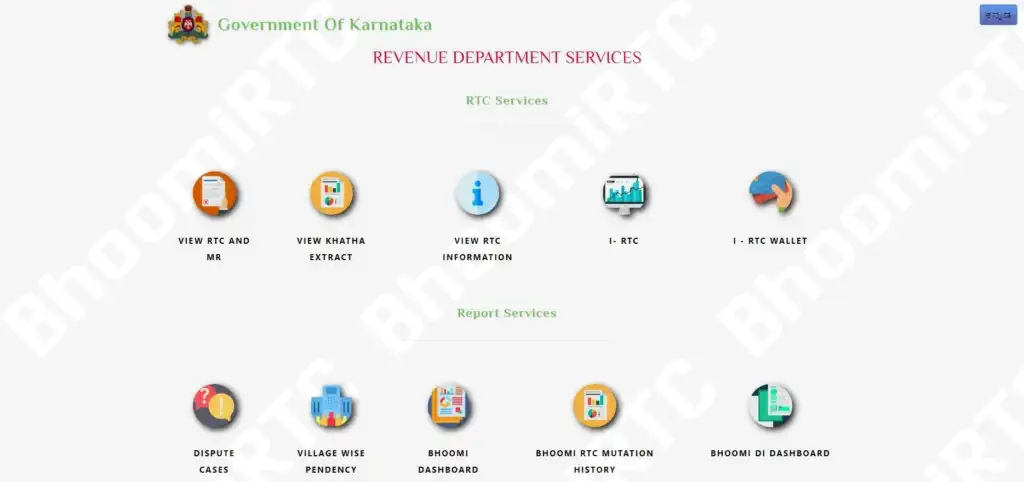
Land Services Available on Karnataka Bhoomi
All the services available on this Pahani online portal are listed below:
RTC Services
- View RTC and MR (Pahani)
- View Khata Extract
- View RTC Information
- I – RTC
- I – RTC Wallet
Report Services
- Dispute Cases
- Village Wise Pendency
- Dashboard
- RTC Mutation History
- DI Dashboard
Land Conversion Services
- Apply Online for Land Conversion
- View Conversion Request Status
- Download Final Conversion Orders
Survey (SSLR) Services
- Viewing of Survey Documents
- Request for Survey Documents
- Revenue Maps
Other Services
- Bhoomi
- Crop Loan Waiver System
- Mojini
- Parihara
- Name Matcha Algorithm
- Dishaank
- Pahani Online | I – RTC
- Citizen Portal
- Binary File to Convert ISFOC to UNICODE
- Mojini V3
- Mojini V3 Application Status
- Mojini Pendency Report
- Contact Details
- Other Land Services
Key Benefits of the Bhoomi Portal
The Bhoomi portal delivers practical, everyday benefits to farmers and landowners across Karnataka. Here is what you can accomplish through it:
- Obtain land records instantly for bank loan applications, court proceedings, or government schemes — without visiting any office.
- Search for any plot by survey number or owner name to confirm ownership details and boundaries.
- Submit a mutation request online when land changes hands through a sale, inheritance, or partition.
- Access crop and tenancy information from your RTC for crop insurance claims and agricultural loan eligibility.
- Track the real-time status of any pending mutation application from your phone or computer.
- Download certified land documents admissible as evidence in legal disputes and court proceedings.
Bhoomi Karnataka RTC – View Land Records RTC Pahani
Follow the step-by-step process below to view your RTC Pahani on the Bhoomi portal.
Step 1: Visit landrecords.karnataka.gov.in
Open the official Bhoomi portal. From here you can access RTC Pahani, MR records, Mutation Status, Mojini V3, Revenue Maps, and all other land services offered by the Karnataka Revenue Department.
Step 2: Choose Your Record Year
On the home page, select either Current Year or Old Year depending on which RTC record you need. Most users will select the current year for day-to-day purposes.

Step 3: Enter Your Area Details
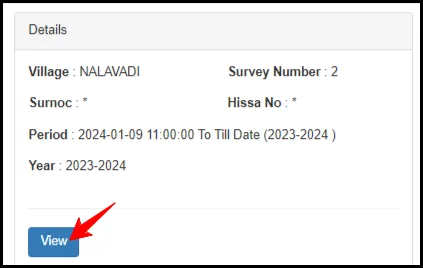
Fill in the required location fields — District, Taluk, Hobli, Village, and Survey Number — then click the Go button. Next, under Select your Surnoc, enter the Part Number, Period, and Year, and click Fetch Details.

Step 4: Verify Your Details
Review the land information displayed on screen. Once you confirm it is correct, click the Verify button. A new page will open showing the full record associated with the details you entered.
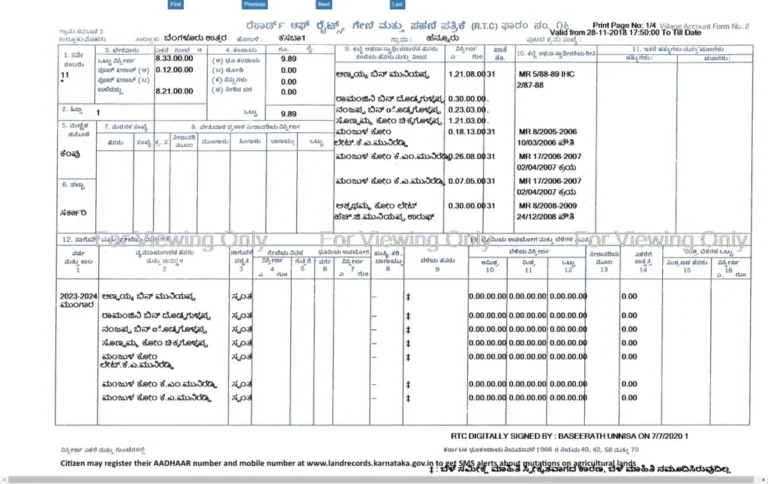
Step 5: View Your RTC Pahani
Your complete RTC Pahani — including ownership details, tenancy information, and crop data — will now be displayed on screen based on the area details you provided.
How to Check Mutation Status in Karnataka
A mutation is the official update of land ownership records following a sale, inheritance, or court order. Follow the steps below to check the status of any pending mutation request:
Step 1: Open the Official Portal
Go to the official Bhoomi land records website and wait for the home page to load fully.
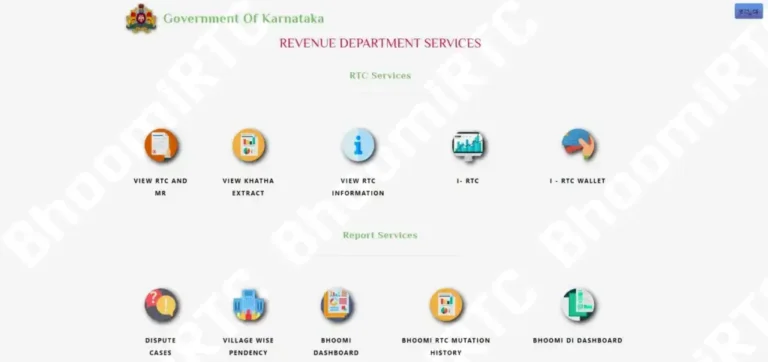
Step 2: Select "View RTC and MR"
On the home page, click the View RTC and MR option. This will open a new page where you can enter your land details.
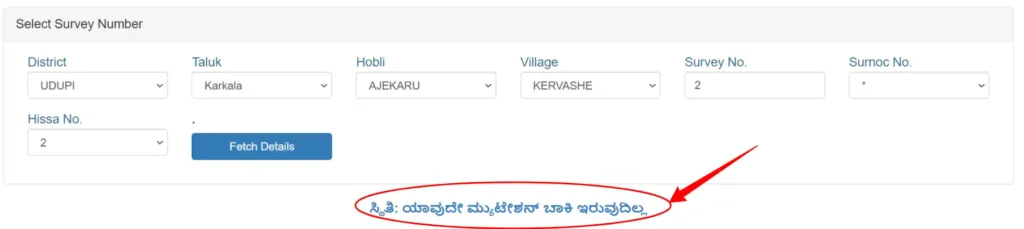
Step 3: Fill in Your Land Details
Enter the following information in the fields provided:
- District
- Taluk
- Hobli
- Village
- Survey No.
- Surnoc No.
- Hissa No.
Once all fields are filled, click the Page Detail link to proceed.

Step 4: View Your Mutation Status
After submitting the details, the portal will display the current status of your mutation — whether it is pending approval, has been approved, or has been rejected — along with any officer remarks.
How to Check Bhoomi RTC Information
The Bhoomi portal offers multiple ways to look up land record details in Karnataka. The steps below cover the most common methods. For the most up-to-date procedures, always refer to the official portal or contact your local revenue office.
You can search for land details in several ways depending on the information you have available. The step-by-step processes for each method are outlined below.
How to Search Karnataka Land Records
Search by Survey Number
- Visit the Bhoomi Portal.
- Select "Search Land Records By Survey Number."
- Enter the District, Taluk, Hobli, Village, Survey Number, Surnoc, and Hissa.
- Click the "Go" button to retrieve the record.
Search by Owner Name
- Visit the Land Record Portal.
- Select "Search Land Records By Owner Wise."
- Enter the District, Taluk, Hobli, and Village.
- Click "View Your Details" to see all plots registered under that name.

Search by Registration Number or Date
- Visit the Bhoomi Portal.
- Select "Search Land Records By Registration Number/Date."
- Enter the District, Taluk, Registration Number, and Registration Date.
- Click "View Your Details" to retrieve the record.

How to Log in to Bhoomi Online RTC
i-RTC Wallet Login
- Visit the official Bhoomi RTC website.
- Under Services, select 'i-RTC'.
- Enter your User ID, Password, and Captcha, then click the login button.
Once logged in, you can recharge your i-Wallet and download digitally certified RTC copies accepted for official and legal purposes.
How to Check Mojini Application Status
Mojini V3 is Karnataka's online system for land sub-division survey applications. If you have submitted a Mojini application and want to track its progress, follow the steps below.
Step 1: Visit the Mojini V3 Portal
Open the official Mojini portal. It can be accessed directly or through the Bhoomi home page under "Other Services."
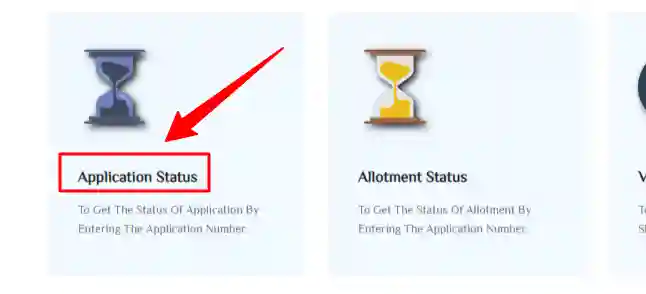
Step 2: Click on "Application Status"
Select the Application Status option from the portal menu to begin tracking your application.
Step 3: Choose "Latest Record" or "Archived Record"
Select one of the two options based on when your application was submitted. For recent applications, choose Latest Record. For older applications, choose Archived Record.

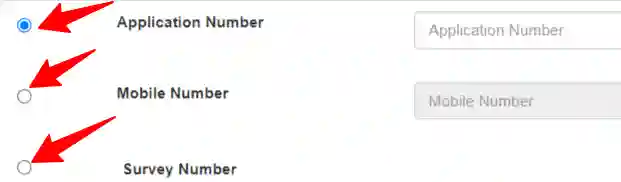
Step 4: Select a Search Method
You can search for your application using any one of three identifiers: Application Number, Mobile Number, or Survey Number. Choose whichever is most convenient.
Step 5: Enter Your Survey Details
If searching by Survey Number, fill in all the required fields in the form:

- District
- Taluk
- Hobli
- Village
- Survey Number
- SURNOC
- Hissa No
Step 6: Click "Get Status"
After entering all the required information, click the Get Status button to submit your query.
Step 7: View Your Mojini Application Status
The portal will now display the current status of your Mojini sub-division application, including the surveyor assigned, stages completed, and any pending actions required.

Contact Details — Bhoomi Help Desk
For technical support, service-related queries, or any issues accessing the Bhoomi portal, you can reach the Bhoomi Monitoring Cell directly using the contact details below.
| Field | Details |
|---|---|
| Address | Bhoomi Monitoring Cell, SSLR Building, K.R. Circle, Bangalore – 560001 |
| Email ID | bhoomi-karnataka@nic.in |
| Helpline Number |
080-22113255 8277864065 8277864067 8277864068 |
Conclusion
The Bhoomi RTC portal has made land record access in Karnataka genuinely simple and transparent. By following the steps outlined above, you can handle almost every land-related task — from viewing your RTC Pahani to tracking a mutation — without leaving home.
If you run into any difficulty accessing your Pahani, Mojini services, Mutation Reports, or any other feature of the Bhoomi portal, leave a comment below and we will do our best to help you resolve it promptly.
If this guide was useful to you, please share it with others who may benefit — good information about government services is always worth passing on.
FAQs
What is Bhoomi?
Bhoomi is Karnataka's official online land records management system, launched by the state government to digitize and provide public access to land ownership, tenancy, and crop information.
What is Bhoomi RTC?
RTC stands for Records of Rights, Tenancy, and Crops. It is the primary land document in Karnataka, containing details about ownership, land use, crop cultivation, and any outstanding government dues on a plot.
How do I get an online RTC extract or Pahani?
Visit the official Bhoomi portal at landrecords.karnataka.gov.in, select "View RTC and MR (Pahani)," enter your District, Taluk, Hobli, Village, and Survey Number, and follow the on-screen steps to view and download your record.
Can I view revenue maps online?
Yes. The Bhoomi portal allows you to view and download revenue maps for any village in Karnataka through the Survey (SSLR) section.
What is the full form of RTC?
Records of Rights, Tenancy and Crops.
What services are available on the Bhoomi portal?
The portal offers RTC services, Mutation Extract and Status, Khata Extract, Revenue Maps, Land Conversion applications, Mojini V3 sub-division surveys, i-RTC digital certificates, and several other land administration services.
How do I check my RTC in Karnataka?
Visit the Bhoomi portal, select the RTC status section, enter your land details (District, Taluk, Hobli, Village, Survey Number), and submit the form to view your record.
How do I check my mutation status?
Go to the Bhoomi portal, navigate to the "Mutation Status" section, enter your application details, and the current status will be displayed immediately.